UPS Backup for Surveillance: Protect the Recording Chain
By Highidea Power Engineering Team · 20 October 2026 · 4 min read
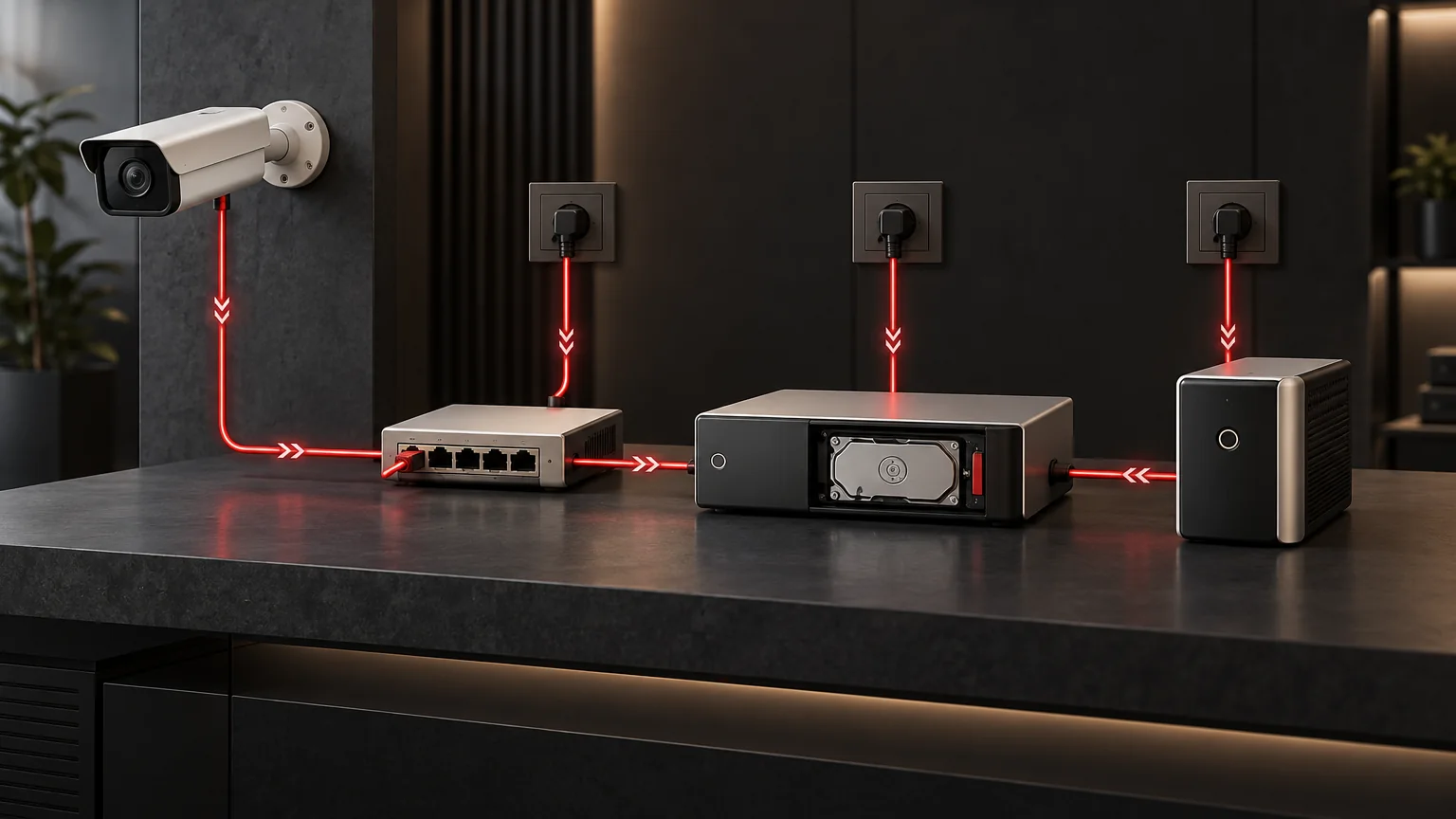
A camera that remains powered does not prove that footage is being recorded. Trace camera power, PoE or adapters, network paths, the recorder and storage, then budget their relevant operating modes. Define the footage that must remain available and verify that outcome through an authorized acceptance plan.
Define the recording service first
Write a requirement a security operator can check: which views must be recorded, where the recordings must be retained and whether remote viewing must also remain available during an outage. Local recording and remote viewing are different outcomes. A failed uplink might interrupt viewing while recording continues locally; a powered camera might transmit to a recorder that has already stopped.
Highidea has photo-backed surveillance and broadcast application references. These establish the application context only. They do not validate the architecture, measured runtime or camera compatibility of the proposed recording system.
Draw the complete chain
The following hypothetical functional map makes the power branches explicit. It is not a wiring plan or a verified compatible system. It assumes PoE cameras and a recorder with internal storage; a real design may need additional branches.
- Video path: cameras → PoE switch → required network device → recorder → internal storage.
- Power branch 1: supply group A → UPS A → PoE switch → cameras.
- Power branch 2: supply group A → UPS A → required network device.
- Power branch 3: supply group A → UPS A → recorder and its internal storage.
- Shared dependency: all three branches use UPS A and supply group A. A separate camera adapter or external storage would need its own identified power path.
Reconcile each named device with the actual system. Do not label one branch protected while leaving a necessary network or storage branch unassessed.
Keep the drawing selective. A remote monitoring terminal may be outside the required recording boundary; a small network switch may be inside it. The service requirement determines which dependency matters, not the device's physical size.
Chain element | Evidence and decision |
|---|---|
Camera | Exact variant, power method, supported recording options and relevant operating modes. |
PoE or adapter | Source capacity, connected-camera budget and documented losses or input demand. |
Network path | Links required for the chosen recording destination; power ownership of intermediate equipment. |
Recorder | Input demand, storage dependencies and permitted shutdown/recovery behavior. |
Storage | Whether recording can continue and later be retrieved when other services are unavailable. |
Remote viewing | Include only when the agreed outage service requires it. |
Budget the night scenario without double counting
Axis's power-consumption white paper distinguishes typical camera conditions with heaters or infrared illumination off from maximum operating scenarios. It also notes that camera consumption excludes Ethernet cable losses. Consequently, a convenient daytime reading is not enough to establish the complete night-time power requirement.
Obtain the relevant camera datasheets and the PoE equipment's input-power information. If the UPS budget uses measured AC input to a switch under the agreed camera scenario, do not add the same downstream camera watts again. If building an estimate from component demands, explicitly account for conversion and cable losses using documented or clearly identified assumptions.
For a hypothetical budget, assume the PoE switch's AC input is 100 W under the agreed night scenario, the recorder is 60 W and the necessary uplink device is 15 W. The UPS sees 175 W for those entries—not 175 W plus the cameras already included in the switch measurement. These are arithmetic assumptions, not recommended equipment ratings or guaranteed runtime.
Separate viewing, recording and playback evidence
An acceptance record should show what was actually observed. “Camera stayed on” is weaker than “the specified interval was recorded and could be played back from the required storage.” A live image does not establish that the recorder saved it.
Use this blank recording-availability record for each required channel and approved scenario. Keep the expected requirement and actual observation separate.
Acceptance field | Record to complete |
|---|---|
Channel/configuration | Camera/channel: __; recorder/storage: __; approved map revision: __. |
Scenario | Relevant camera mode: __; permitted test-scope reference: __; required recording interval: __. |
Observed coverage | First/last available footage times and time basis: __; missing interval, or none observed: __. |
Destination | Actual retained location: __; retrieval time and method reference: __. |
Playback | Interval reviewed: __; playback result: __; limitations: __. |
Decision | Required outcome: __; pass/fail/unverified: __; reviewer/date: __; unresolved owner: __. |
The responsible security, IT and electrical teams must approve any interruption test; this article is not a switching procedure.
Where a test cannot cover a particular camera mode or network failure, record that limitation. Do not convert a successful test of one channel into a claim covering every camera or a longer outage.
Turn the map into a supplier requirement
Send the UPS supplier the agreed chain drawing, scenario-based input demand and required recording duration. Include recovery requirements: a returned supply is not proof that recording resumed correctly.
Ask Highidea to assess the resulting electrical requirement, while the camera, network and recorder suppliers confirm their own behavior. Keep storage retention and footage verification with the security system owner. This division prevents a UPS runtime quotation from being mistaken for end-to-end video availability.
Primary references
The references support the specific distinctions stated above. Manufacturer examples apply to their documented products; they do not establish the same capability in a Highidea model. Proposed worksheets and hypothetical examples are editorial decision tools, not approved installation or operating procedures.
Axis Communications: Typical and maximum power consumption in Axis cameras
Cisco: N93108TC-FX3 Hardware Installation Guide: Plan for power requirements
FAQ
Frequently asked questions
Do all cameras need individual UPS units?
Not necessarily. Assess the actual power architecture, including PoE and shared dependencies, before choosing an arrangement.
Does local camera storage remove network dependencies?
It may change them, but only if the exact camera supports the required local recording and retrieval workflow. Confirm that behavior rather than assuming it.
Can a UPS guarantee no lost footage?
No blanket guarantee follows from a UPS rating. Electrical continuity, recording behavior, storage and recovery all need their own evidence.
Related
Products, solutions & further reading.
Put this into practice
Need help specifying the right unit?
Share the load, voltage, runtime, environment and destination for a configuration review.